
ToMotion practical guide
Create Differentiated Video Lessons for Different Learning Levels
Differentiate a video lesson by changing the support, prerequisite explanations and challenge while keeping the learning goal clear. Use evidence of what learners already understand to choose a version, then check their understanding with a task rather than assuming a longer or more colorful video is better.
By ToMotion AI, a product of Assureme Technologies Private Limited.
Written by ToMotion AI. Worked scripts and planning diagrams are original illustrative examples. Product instructions reflect the create workflow reviewed on October 4, 2026; source guidance is linked where used.
Script-mode steps apply when Use own script is available in your create screen. If you do not see that control yet, start with a reviewed source brief in prompt mode.
At a glance
- Keep one explicit learning goal across versions.
- Choose support using evidence of prerequisite knowledge.
- Check the learner’s reasoning, not just video completion.
Keep the learning goal stable
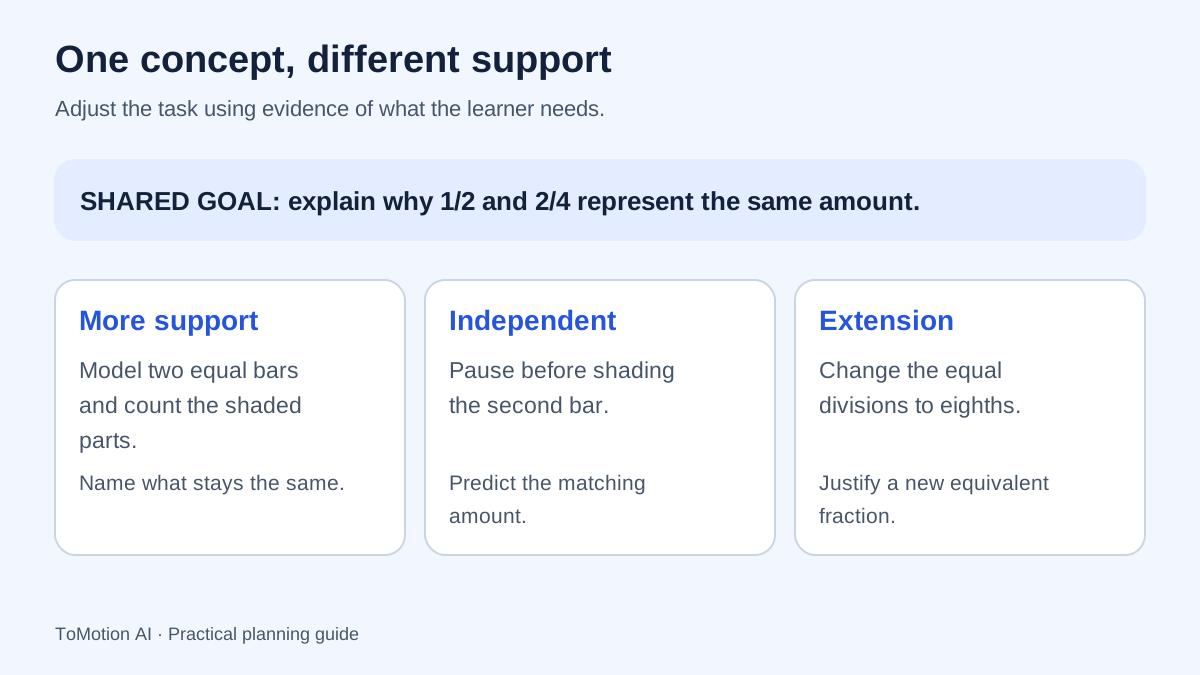
Start with a goal that can be demonstrated. In this worked example, the learner should explain why one half and two quarters cover the same amount of an equal-sized whole. The supported, independent and extension versions all connect to that goal; they differ in how much reasoning the video supplies.
Avoid permanently labeling learners as beginner, visual or advanced. A person may need support with one prerequisite and be ready for a greater challenge elsewhere. CAST’s Universal Design for Learning guidelines provide a framework for anticipating learner variability and offering support; they do not prescribe the three-version lesson below.
Check the prerequisite before choosing a version
Ask the learner to divide a shape into equal parts and identify one selected part. If equal partitioning is unclear, a video that immediately compares fraction notation may skip the actual difficulty. If that prerequisite is secure, repeating it at length may distract from the new reasoning.
Use a short question, an explanation in the learner’s own words or a recent work sample. Record the specific gap you observed. Choose support for that gap and allow the learner to move to another version after demonstrating understanding.
Plan three versions of the same concept
The following is an original planning example, not a tested intervention or a claim about grade placement. The rectangle sizes and equal partitions are constraints the finished diagrams must satisfy. Check those details manually in any AI-generated video.
| Version | What the video supplies | What the learner does |
|---|---|---|
| Supported | Identical rectangles, explicit equal divisions and a narrated comparison | Describe which shaded areas match and why. |
| Independent | The same model with fewer intermediate hints | Predict the matching fraction before the reveal. |
| Extension | A new equal-whole comparison and an incomplete explanation | Construct another equivalent fraction and justify it. |
Write the supported version
Use explicit language for the relevant objects. Say “these rectangles are the same size” rather than hoping their appearance alone carries that fact. Let the viewer inspect the comparison before introducing another representation. Avoid adding decorative objects that could be mistaken for parts of the mathematical model.
Teach why 1/2 and 2/4 describe the same amount of an equal-sized whole. Show two identical rectangles. Divide the first into two equal parts and shade one. Divide the second into four equal parts and shade two. State that the shaded areas are equal. Ask: what stayed the same, and what changed? Keep labels correct and use no unrelated objects.
Reduce hints before increasing complexity
For the independent version, keep the whole and representation familiar, but ask the learner to predict before the explanation. For the extension, change a controlled part of the example and request a justification. Do not increase language difficulty, diagram complexity and conceptual demand simultaneously without a reason.
The Institute of Education Sciences practice guide recommends combining graphics with verbal explanation and using worked examples alongside problem solving. That supports pairing a demonstration with a learner task; it does not prove that these particular generated videos improve outcomes.
Use an equal-sized whole to introduce 1/2 and 3/6. Ask the learner to predict whether the amounts match before showing the comparison. Then ask them to draw a different equivalent fraction and explain their reasoning. Show equal partitions and consistent labels. Avoid describing an unsupported answer as correct.
Review a real video as a starting point
The existing ToMotion fractions example below can help you decide what visual treatment suits your class. It is not a set of three differentiated versions, and the prompts on this page are not claimed to be its original input. Create and review the versions your own learners need.
In ToMotion, prepare the reviewed narration for each version and place it in Script when using Use own script. Keep the learning goal and necessary diagram constraints in Video instructions. Maintain a simple version name outside the product so the supported and extension files are not confused during distribution.
Check understanding and accessibility
Give all versions a task that reveals the intended reasoning. If the goal is equivalence, asking a learner to recognize a colorful shape is insufficient. Ask them to compare equal wholes, explain a choice or create another example, then use the response to plan the next instruction.
Review captions, the text alternative and the visibility of mathematical labels. Provide access to the explanation without requiring a learner to hear the audio. Keep essential distinctions understandable through labels or narration rather than color alone. Teacher review remains necessary for both subject accuracy and suitability.
Sources
Quick checklist
Define a demonstrable learning goal.
Check the prerequisite.
Vary support deliberately.
Verify equal partitions and labels.
Provide captions and text support.
Use a transfer question after viewing.
FAQ
Is differentiation the same as making an easier video?
No. It can change scaffolding, prerequisite explanation, pace or challenge. The choice should respond to a specific learning need while keeping the goal clear.
Should I make a version for every student?
Not automatically. Start with the needs revealed by assessment and use a manageable set of supports. Review whether each version addresses a meaningful difference.
Does ToMotion automatically assess students?
This guide describes a teacher-planned workflow. It does not claim that ToMotion diagnoses learning needs, assigns levels or measures learning outcomes.
Create your own AI video
Use ToMotion AI to turn prompts, scripts and prepared source material into narrated animated videos.