
ToMotion practical guide
How to Make Faceless Educational YouTube Videos with AI
A faceless educational video teaches through narration, diagrams, examples or real screen footage without requiring an on-camera presenter. Start with a question you can answer accurately, build an original explanation, and use AI to help produce the visuals rather than to replace the research.
By ToMotion AI, a product of Assureme Technologies Private Limited.
Written by ToMotion AI. Worked scripts and planning diagrams are original illustrative examples. Product instructions reflect the create workflow reviewed on October 4, 2026; source guidance is linked where used.
Script-mode steps apply when Use own script is available in your create screen. If you do not see that control yet, start with a reviewed source brief in prompt mode.
At a glance
- Build each episode around a researched question.
- Add an original explanation and a useful worked example.
- Review both the output and YouTube’s current publishing policies.
Made with ToMotion
Example: a faceless lesson using a visual analogy
Nesting dolls make the abstract idea of recursion visible. This ToMotion example combines a narrated explanation with a consistent drawing style in a portrait format suitable for a short educational video.
- English
- Portrait · 9:16
- About 49 seconds
- Bold Marker
- Kore voice
What to take from this example
Use the dolls to introduce the concept, then ask viewers to identify the base case. A follow-up episode could demonstrate the same idea with code. Review the teaching example for accuracy before publishing to your channel.
Read the video transcript
Imagine a set of nesting dolls. You open the biggest doll, and inside is a smaller doll that looks almost the same. Open that one, and there’s another, and another. That “same thing inside itself” idea is recursion. Recursion is when something solves a problem by using a smaller version of the same problem. Like: “To find what’s inside, open a doll… and then open the next doll the same way.” But recursion also needs a stopping point, called a base case. With dolls, it’s the tiniest doll that doesn’t open. That’s how you know you’re done. So remember: recursion is repeating the same steps on smaller and smaller pieces, until you reach the smallest piece and stop.
Choose a question you can answer well
A broad theme such as “science facts” gives you little guidance about what belongs in one episode. A question such as “Why does doubling a force change acceleration?” gives the script a destination. Define the audience’s starting knowledge and the misconception the episode will address.
Build a small research note before writing: the answer, the sources that support it, one useful example and any limitations. If you cannot explain why a statement is true, investigate it before turning it into narration. A confident voice and attractive animation do not make an unsupported claim reliable.
Add your own explanation and teaching decisions
Originality can come from the example you choose, how you unpack a difficult step or the question you ask the viewer to solve. Simply changing the voice or drawing style of somebody else’s script does not create a strong educational contribution. Keep a record of your sources and the parts you developed yourself.
YouTube’s monetization policies assess original, authentic content and address reused or repetitive material. AI use is not a promise of eligibility or a reason to ignore those standards. Read the current policy before building a publishing process around repeated templates.
Build an episode around one explanation
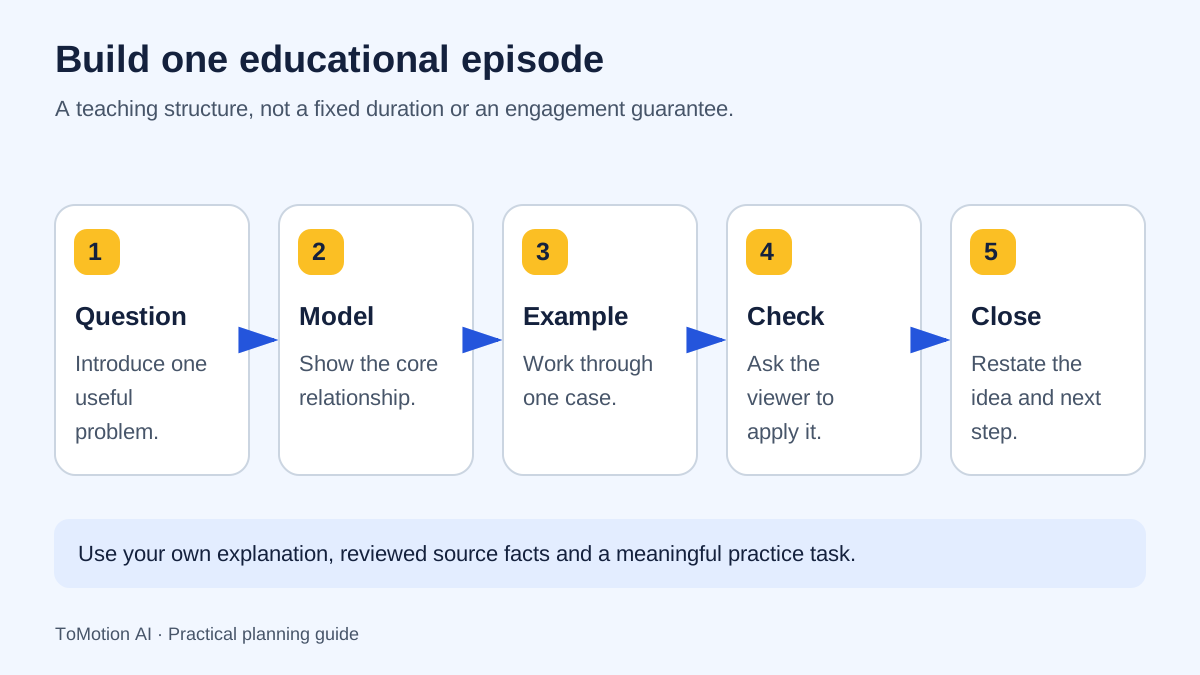
Use a hook that states the real question, not an exaggerated promise. Give the viewer enough context to follow the answer, demonstrate the difficult part and finish with a small transfer question. The question at the end should test the idea rather than ask only whether the viewer enjoyed the video.
| Part | Purpose | Example direction |
|---|---|---|
| Question | Identify the puzzle | Why can the same push move two objects differently? |
| Model | Introduce the variables | Show the object, applied force and mass. |
| Worked example | Explain one controlled change | Keep the mass fixed while changing force. |
| Check | Ask the viewer to apply the model | What changes if the mass increases instead? |
| Close | Restate the answer and point to the next lesson | Summarize the relationship without adding a new topic. |
Study a real illustrated example
The Newton’s Second Law video below is an existing ToMotion example. Use it to consider whether the visual makes the relationship easier to follow, and whether a learner could distinguish what changes from what stays constant. It is a format reference, not an independent test of learning outcomes.
When making your own science or mathematics episode, verify the explanation with a suitable subject source. Have someone check equations, labels and causal language separately from the style review. Do not let a dramatic illustration turn an idealized classroom model into a claim about every real-world situation.
Produce the narration and visual plan
Write the spoken explanation first when the sequence matters. In ToMotion, use Use own script for prepared narration and Video instructions for the scene plan. Select landscape for a conventional YouTube episode or portrait when designing a Short from the start. Choose a duration supported by the current create form.
A useful visual instruction names the relationship, not just the art style. Ask for the same object across a controlled comparison, consistent labels and a simple background. Then inspect the actual output: an instruction is a request, not a guarantee that each generated scene is correct.
Audience: learners encountering this concept for the first time. Goal: explain [one relationship]. Approved facts: [source-checked notes]. Structure: question, model, worked example, learner question, recap. Keep the same symbols and object names throughout. Show only the visual elements needed for the current explanation. Do not introduce unsupported historical claims or invented statistics.
Prepare the upload for the person searching
Write a title that accurately describes the question answered. Make the thumbnail and opening agree with that promise. Add a description that identifies the topic, sources and any useful next lesson. A searchable title will not rescue a video that delays or never delivers the promised explanation.
Review captions against the final audio and make important visual information understandable in the narration or accompanying text. YouTube also has disclosure requirements for certain realistic altered or synthetic content. Assess the actual content against that guidance; do not assume every illustrated animation requires the same disclosure choice.
Use the first episodes to improve the teaching
Publish a small coherent series before trying to increase volume. Look at where viewers leave, what questions they ask and whether the title attracted the intended audience. Those signals can suggest an unclear opening, missing prerequisite or overly broad topic, but none establishes the cause by itself.
Revise one identifiable problem at a time. If viewers cannot follow a diagram, simplify its labels or explain the missing step. If they wanted a different answer, revise the topic and title. Keep the decisions in an episode log so improvement comes from evidence rather than a promise of automatic channel growth.
Sources
- YouTube: channel monetization policies — checked
- YouTube: altered or synthetic content disclosures — checked
- W3C: planning accessible audio and video — checked
Quick checklist
Define the question and audience.
Keep a source note.
Write an original example.
Check every diagram and label.
Review captions and disclosure requirements.
Use viewer feedback to refine the next episode.
FAQ
Can a faceless AI channel be monetized?
Eligibility depends on YouTube’s current policies and review of the channel and content. Neither using AI nor publishing a certain number of videos guarantees acceptance.
Do I need to record my face?
No. An educational explanation can use diagrams, animation, narration and real screen footage. Choose the format that best teaches the subject.
Can I reuse another creator’s script with a different AI voice?
A different voice does not by itself make the work original. Develop your own explanation, use material you are entitled to use and review the platform’s reused-content policy.
Create your own AI video
Use ToMotion AI to turn prompts, scripts and prepared source material into narrated animated videos.