
ToMotion practical guide
Product Explainer Video Guide: Script, Storyboard and Example
A product explainer tells a specific audience what a product helps them do, how that change works and what to do next. Build the story around one customer problem and a supported benefit, then choose animation or real product footage according to what the viewer needs to see.
By ToMotion AI, a product of Assureme Technologies Private Limited.
Written by ToMotion AI. Worked scripts and planning diagrams are original illustrative examples. Product instructions reflect the create workflow reviewed on October 4, 2026; source guidance is linked where used.
Script-mode steps apply when Use own script is available in your create screen. If you do not see that control yet, start with a reviewed source brief in prompt mode.
At a glance
- Explain one customer problem and one useful change.
- Show the mechanism behind the benefit.
- Verify product claims in the final output.
Pick one viewer and one decision
Decide whether the video introduces the product to a new visitor, explains a feature to an existing customer or helps a buyer evaluate a workflow. A single script often becomes vague when it tries to serve all three audiences. Write the decision the viewer should be able to make after watching.
For a first-time visitor, that decision may be whether the product fits their task. For an existing user, it may be whether to try a particular feature. Start with the language those people use to describe the problem, and explain internal terminology only when it becomes necessary.
Separate the benefit from the evidence needed to support it
A useful benefit describes a change in the customer’s work. “See outstanding requests in one place” is more concrete than “transform your productivity.” Check that the actual product supports the described change and that the intended customer can access the feature.
Quantified claims, customer quotes and comparisons need evidence appropriate to the statement. If you have not measured a time saving, show the workflow instead of inventing a percentage. A fictional example should be labeled as such and should not resemble a real customer endorsement.
| Draft statement | Question before publication |
|---|---|
| Find requests in one place | Does the product actually provide this view for the intended user? |
| Finish twice as fast | What measurement supports the comparison and under what conditions? |
| Used by a named customer | Do we have permission and evidence for that specific statement? |
| Works with every tool | Which integrations are actually supported and available? |
Worked example: explain a fictional request tracker
The example below is an original script for a fictional product called TaskBoard. It demonstrates structure only; it does not describe a ToMotion feature or an existing customer. The script names the problem, explains one useful change and ends with a small next step.
When requests arrive in different conversations, it can be hard to see what still needs attention. TaskBoard brings each request into a shared list with an owner and a status. Add the request, choose the person responsible and update the status as work progresses. Your team can then review the same list instead of reconstructing the story from separate messages. Start with one small project and agree on the statuses your team will use. That gives everyone a common place to check what happens next.
Storyboard the change the customer should understand
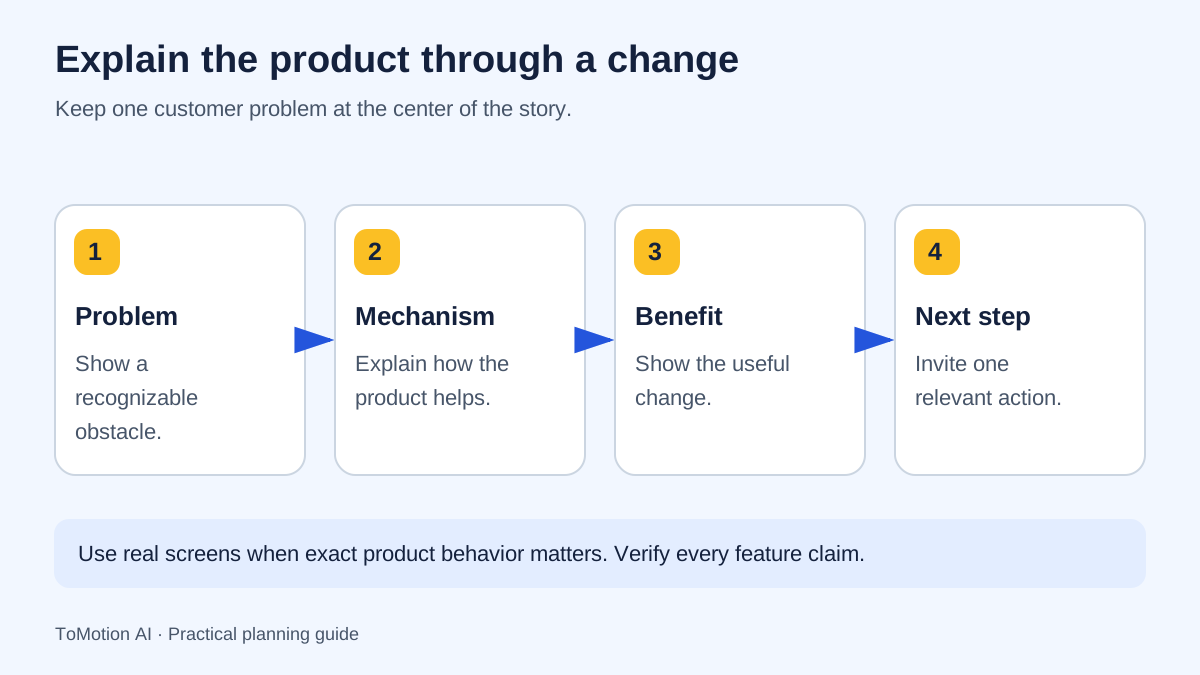
Show the customer’s situation before adding product detail. Then show the mechanism that creates the benefit: a shared list, an assignment or a visible handoff. If the mechanism is missing, the video can sound like a promise without explaining why the product would help.
Use an abstract illustration when the point is conceptual. Use an approved screen recording when interface behavior is the point. If you draw a fictional interface, identify it as a schematic and do not imply that it is a screenshot of the shipping product.
| Beat | Narration purpose | Visual plan |
|---|---|---|
| Problem | Requests are scattered | Separate message bubbles containing different requests. |
| Mechanism | A shared list connects the work | Requests move into a simple labeled list. |
| Responsibility | Every request has an owner and status | Highlight one row and its two fields. |
| Next step | Try a small project | Show one modest project rather than a giant rollout. |
Produce the illustrated draft
Use Use own script in ToMotion when the narration has been reviewed. Put the spoken copy in Script and the visual sequence in Video instructions. Include the customer’s context, terms that must remain unchanged and the specific relationships the illustration should explain.
Attach an approved image reference if it helps establish a visual direction or product object. The current create form accepts PNG, JPEG and WebP references. An uploaded image does not guarantee an exact interface reproduction, so inspect the finished result and use real footage when accuracy requires it.
Review the output as a buyer would
Watch the video once without pausing and write down what product you think it describes, who it serves and the next step. Ask someone outside the project to do the same. If their answer differs from the brief, revise the explanation before polishing transitions.
On a second pass, verify every feature, label, logo, price and action. Check the final frame on a phone as well as a desktop. The call to action should stay readable and should lead to the relevant destination, such as a product page or a guided first task.
Place the video where it helps the decision
A product page video should answer the question that brought the visitor there. Surround it with clear text, the relevant details and a working next step. Avoid making people watch a full video to discover a basic limitation or an essential purchasing fact.
Set a measurement that matches the purpose: qualified visits to a feature page, a useful first action or feedback on comprehension. Keep traffic source and placement in view when comparing results. A change in conversions after publishing is worth investigating, but it does not by itself prove the video caused the change. Prepare captions and a text alternative for the final creative.
Sources
- Digital.gov: plain language guidance — checked
- W3C: planning accessible audio and video — checked
Quick checklist
Define the viewer and decision.
Check every product claim.
Label fictional examples.
Match visuals to the mechanism.
Test comprehension with a new viewer.
Provide a relevant next step and text support.
FAQ
What is the difference between an explainer and a product demo?
An explainer introduces the problem, benefit and underlying idea. A demo shows how the actual product behaves. A buyer may need both, but their scripts and visual evidence differ.
How many features should the script include?
Include the features needed to explain the selected benefit. A complete feature inventory usually belongs in documentation or a separate walkthrough.
Can animation replace an accurate interface demo?
Animation can explain concepts. For exact controls, fields and interactions, use current approved screenshots or screen recordings rather than a generated approximation.
Create your own AI video
Use ToMotion AI to turn prompts, scripts and prepared source material into narrated animated videos.