
ToMotion practical guide
Whiteboard Animation vs AI Avatars vs Screen Recording
Use whiteboard-style animation to explain concepts and relationships, a presenter-led format when the speaker’s role matters, and screen recording when viewers must see an actual interface. The right choice depends on what must be understood or verified, not on a universal ranking of video formats.
By ToMotion AI, a product of Assureme Technologies Private Limited.
Written by ToMotion AI. Worked scripts and planning diagrams are original illustrative examples. Product instructions reflect the create workflow reviewed on October 4, 2026; source guidance is linked where used.

At a glance
- Choose the format according to what must be shown.
- Use real interfaces for exact product actions.
- Compare the same task and source facts in any pilot.
Start with what the viewer must see
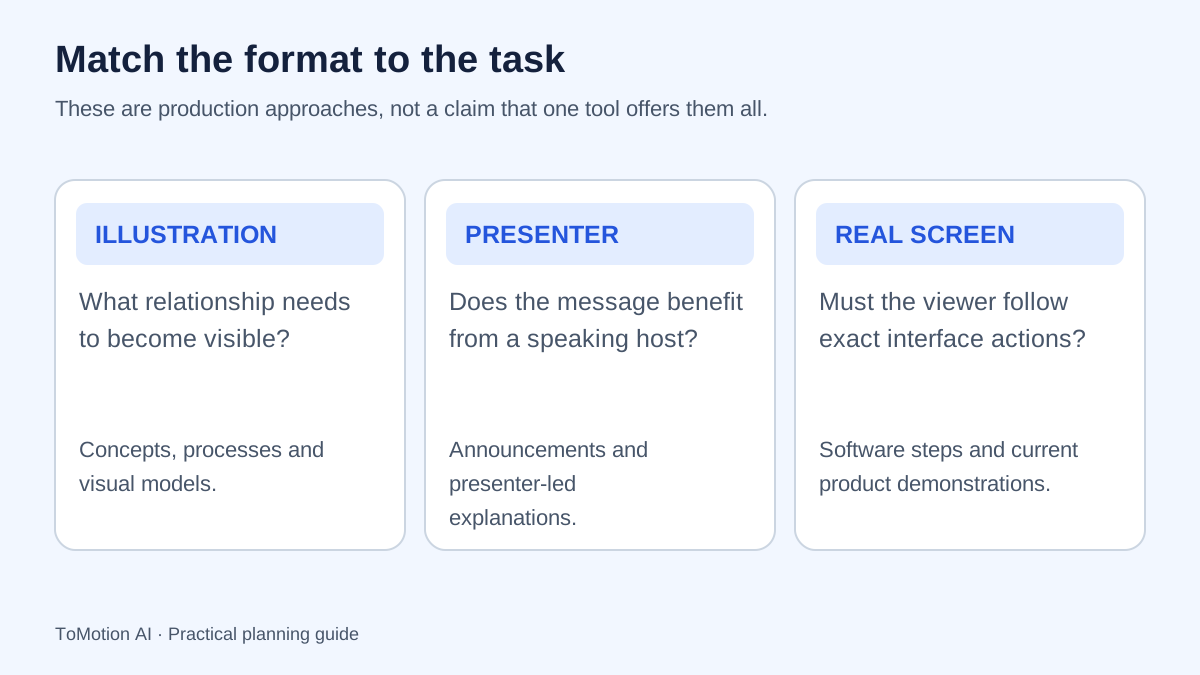
Ask whether the video needs to show an idea, a person communicating or a product being used. A process diagram can make a handoff visible. A presenter can deliver an announcement. A screen recording can show the current location of a control. Each supplies a different kind of evidence.
Do not assume that the most realistic-looking video is the most accurate. An animated diagram can represent a relationship correctly, while a realistic generated interface may show controls that do not exist. Match the visual evidence to the promise made in the title and narration.
Compare the formats against a practical task
The table describes common production uses, not guaranteed effects on engagement, learning or sales. Individual tools differ in features, licensing and editing controls. Test the task with the actual product you are considering before making a purchasing decision.
| Format | Useful when | What to verify |
|---|---|---|
| Whiteboard-style animation | The audience needs a concept, sequence or relationship explained | Diagram accuracy, labels and narration alignment. |
| AI avatar or filmed presenter | The communication benefits from a visible presenter | Identity permission, delivery, disclosure and factual script accuracy. |
| Screen recording | The viewer needs to perform exact interface actions | Current product version, account permissions and visible private data. |
| Combined sequence | A concept needs explanation before a real demonstration | A clear transition and consistent terminology across formats. |
When an illustrated whiteboard explanation fits
Choose an illustrated explanation when showing the relationship is more useful than showing a person’s face. Examples include a fraction comparison, the route of a support request or the reason for an additional sign-in step. The drawing should make the important structure visible.
The Institute of Education Sciences recommends connecting graphics and verbal descriptions in instruction. That supports aligning the visual with the spoken explanation; it does not establish that whiteboard animation is always better than a presenter or a screen recording.
When a visible presenter fits
A presenter-led format can be appropriate for an introduction, announcement or explanation where the communication role is part of the message. Decide whether an actual person should record it, whether an authorized synthetic presenter is appropriate, and what the audience should know about how it was made.
Do not imply that a synthetic presenter is a real customer, employee or expert who gave an endorsement. Review the destination’s disclosure rules where applicable. YouTube, for example, provides specific guidance for realistic altered or synthetic content; assess the actual media against that guidance.
When screen recording is the clearer choice
Use a real recording when the learner must find a menu, enter information or recognize the result of a product action. Prepare a clean demonstration account, set up the starting state and rehearse the path. Remove notifications and sensitive information before capture.
Show enough context to orient the viewer, then focus attention on the control that matters. Explain prerequisites such as account role or plan where they affect availability. Add an update trigger for interface changes so a once-correct recording does not remain the default answer after the product moves on.
Combine formats when the task needs both
For onboarding, use an illustrated introduction to explain why a process exists, followed by a real walkthrough of the current system. For a product page, explain the customer problem first and then show the feature in use. Keep the same names and order so the second part builds on the first.
You can create the illustrated portion in ToMotion and assemble it with other footage in a suitable editor if needed. This guide does not claim that ToMotion supplies avatar generation, a screen recorder or a built-in editor for combining these formats. Verify the current capabilities of every tool in your workflow.
Compare a small pilot using the same task
Give each format the same source facts, audience and intended outcome. Ask reviewers to perform the task or explain the concept afterward. Record production effort, corrections and update difficulty alongside the finished output. A format that is attractive but expensive to keep accurate may not fit your team.
Prepare captions and an appropriate text alternative for whichever format you choose. W3C’s guidance helps plan accessibility across audio and video; choosing an illustrated or presenter-led style does not remove that responsibility.
| Question | Why it matters |
|---|---|
| Did the viewer understand or complete the task? | Checks the purpose of the video. |
| What factual corrections were needed? | Makes review effort visible. |
| How would a changed instruction be updated? | Tests maintainability. |
| Can the audience use the content without relying only on audio or vision? | Checks the supporting access plan. |
Sources
Quick checklist
State the viewer’s task.
Choose concept, presenter or real screen evidence.
Verify tool capabilities.
Check permissions and disclosures where relevant.
Plan accessibility.
Record maintenance and review effort.
FAQ
Is whiteboard animation better than an AI avatar?
Neither is universally better. A diagram may better explain a relationship, while a presenter-led format may suit an announcement. Evaluate the intended task and the actual output.
Can I use generated screenshots instead of recording the product?
Use real, current product screens when exact interface behavior matters. Generated schematics can explain concepts but should not be passed off as accurate product documentation.
Does ToMotion include all three formats?
This article compares production approaches. It does not claim that ToMotion includes an AI avatar system or screen recorder. Use ToMotion for the illustrated explainer portion and verify other tools as needed.
Create your own AI video
Use ToMotion AI to turn prompts, scripts and prepared source material into narrated animated videos.