
ToMotion practical guide
Turn Help Center Articles into Customer Support Videos
Turn a help article into a support video by selecting one customer task, preserving the verified steps and showing the result the customer should expect. Keep the written article available for scanning and updates, and use real screen footage whenever exact interface actions matter.
By ToMotion AI, a product of Assureme Technologies Private Limited.
Written by ToMotion AI. Worked scripts and planning diagrams are original illustrative examples. Product instructions reflect the create workflow reviewed on October 4, 2026; source guidance is linked where used.
Script-mode steps apply when Use own script is available in your create screen. If you do not see that control yet, start with a reviewed source brief in prompt mode.
At a glance
- Choose a specific support task and verify the source.
- Use real screens for exact clicks and animation for concepts.
- Maintain the video and written answer together.
Choose a task that benefits from being shown
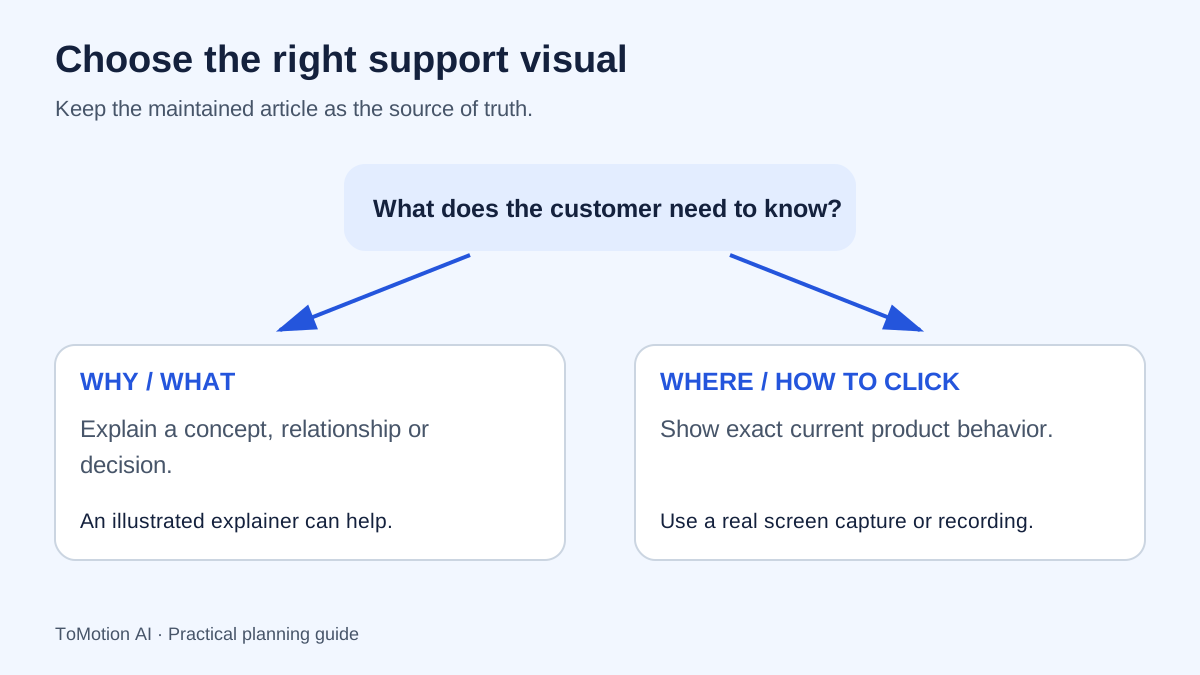
Start with a repeated question where explanation or demonstration can remove confusion. A conceptual question, such as why an invitation is needed, may suit animation. A question about finding a particular menu is usually better served by a current screenshot or screen recording.
Do not convert an entire help center simply because generation is possible. Identify the part customers misunderstand and decide whether a video addresses that difficulty. If the underlying article is outdated or incomplete, fix its source content before making a second version of the same problem.
Build a source checklist from the current answer
Capture the task, prerequisites, steps, expected result and escalation route. Note the product version, account type or permission level if they change the instructions. An action that works for an administrator may not exist for a standard user.
The Consortium for Service Innovation’s KCS guidance emphasizes reusing and improving knowledge in the course of use. For this workflow, keep the video tied to the maintained answer rather than allowing it to become an independent, unowned set of instructions.
| Item | What to record |
|---|---|
| Task | The exact question this video answers. |
| Prerequisite | Required account role, access or starting state. |
| Procedure | Approved steps in the correct order. |
| Success | What the customer should see or be able to do. |
| Exception | When to stop and use the support route. |
| Owner | Who reviews the article and video when the product changes. |
Use a script that preserves the exception
This fictional example explains an invitation problem without inventing the interface of a real product. It is deliberately written as a decision rather than a list of guesses. Adapt it only after checking the actual behavior of your own service.
A script should not turn a possible cause into a diagnosis. Use conditional language when the source provides a troubleshooting branch. Include the useful next step when the first check does not solve the problem, rather than ending with “that should fix it.”
If your workspace invitation is not opening, first confirm that you are signing in with the address that received it. If the address is different, ask the workspace administrator to check the invitation details. If the address is correct but the invitation is no longer valid, use the approved support route to request a new invitation. Do not share your password in a support message. Include the affected workspace and the message you see so the team can investigate the right issue.
Choose animation or a real interface recording
Use an illustration to explain the relationship between the invited address, the user and the workspace. Use real screen footage to demonstrate exactly where the product displays an invitation or an error. A generated mock interface can be a conceptual drawing, but it should not masquerade as current product documentation.
Keep test data in the recording. Remove personal customer details, tokens and private messages before capturing the screen. If an action changes account settings or sends an invitation, demonstrate it in an appropriate test environment rather than a customer account.
Prepare the illustrated explanation in ToMotion
Paste the relevant source text into your brief or prepare narration for Use own script. The reviewed attachment control accepts images, so select approved image references when useful; do not assume that pasting a help-center URL imports the full article.
Put the conceptual scene plan in Video instructions. Ask for consistent labels and the same role names across scenes. After generation, compare each claim with the maintained article. If the video introduces an extra step, an unsupported guarantee or an invented button, correct the explanation before publication.
Place the video beside the written answer
Keep the article’s steps accessible as text. A returning customer may need one line rather than an entire video, and text can be searched, translated or read by assistive technology. Add captions and a transcript based on the final audio, not a draft that changed during production.
Name the task clearly in the video title and put the relevant written answer close to the player. Where permissions allow, provide a stable link that support agents can share. Avoid making a video the only way to obtain an essential instruction.
Maintain both versions and check whether customers succeed
Keep a simple record containing the article URL, video URL, supported product state, owner and last review. Define update triggers such as a renamed menu, a changed permission rule or a new exception. Review the video when any of those change.
Measure the task you intended to improve. Helpful feedback, repeated questions and successful task completion are more informative than views alone. A fall in ticket volume can have many causes; do not attribute it to the video without considering changes in traffic, product behavior and support availability.
| Field | Example placeholder |
|---|---|
| Source | [Maintained article URL] |
| Video | [Published video URL] |
| Owner | [Responsible support or product team] |
| Trigger | [UI, policy or permission change] |
| Review | [Date and reviewer] |
Sources
Quick checklist
Check the article’s current accuracy.
Preserve prerequisites and exceptions.
Choose the right visual format.
Use clean test data.
Publish text and captions with the video.
Set an owner and update triggers.
FAQ
Can I paste a help article URL and assume ToMotion imports it?
Do not assume URL import. In the reviewed workflow, prepare the relevant source text and paste it into a brief or script, with approved image references if needed.
Should a video replace the written help article?
Usually keep both. Text is useful for scanning, searching and checking an exact step, while video can explain a relationship or demonstrate an action.
Will support videos reduce tickets?
They may help customers complete a task, but the effect should be measured. Views alone do not establish a reduction in support demand.
Create your own AI video
Use ToMotion AI to turn prompts, scripts and prepared source material into narrated animated videos.