
ToMotion practical guide
How to Make AI Explainer Videos Look Professional
An AI explainer looks professional when the story is coherent, the visuals explain the right idea and the audio is easy to follow. Review those fundamentals before adding decoration. Identify the specific failure, change the relevant part of the brief and inspect the new output against the original goal.
By ToMotion AI, a product of Assureme Technologies Private Limited.
Written by ToMotion AI. Worked scripts and planning diagrams are original illustrative examples. Product instructions reflect the create workflow reviewed on October 4, 2026; source guidance is linked where used.
Script-mode steps apply when Use own script is available in your create screen. If you do not see that control yet, start with a reviewed source brief in prompt mode.
At a glance
- Check factual and visual accuracy before decoration.
- Describe the failure precisely enough to revise it.
- Recheck the whole output after a material change.
Define quality in terms of the viewer’s task
A clean illustration can still explain the wrong relationship. A fluent voice can still read an overcomplicated script. Start by asking what the viewer must understand or do, then assess whether the video makes that outcome possible without unnecessary effort.
Brame’s review of educational video research discusses cognitive load, engagement and active learning. Those are useful lenses for instructional content, not evidence that a particular ToMotion style produces a measured learning improvement. The practical rubric below is an editorial review tool.
Use a rubric that catches different kinds of failure
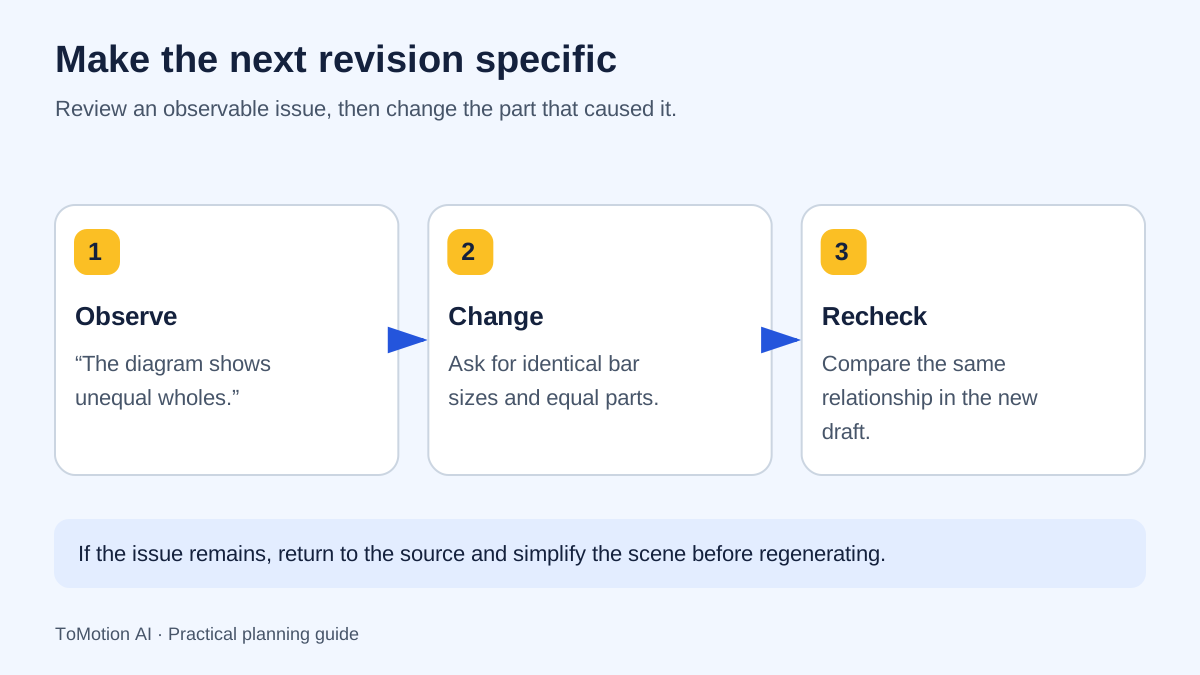
Review accuracy separately from appearance so a polished scene does not distract from a factual mistake. Give each issue a concrete description and a proposed change. “Scene three shows the arrow in the wrong direction” is actionable; “make it more premium” is not.
| Dimension | What to inspect | Useful revision |
|---|---|---|
| Accuracy | Facts, labels, quantities and causal relationships | Correct the source brief or required relationship. |
| Story | Opening, sequence and ending | Remove a detour or add a missing transition. |
| Visual clarity | Crowding, scale and reading order | Reduce objects or separate the comparison. |
| Narration | Pronunciation, pace and unexplained terms | Revise the spoken copy or choose a more suitable delivery. |
| Consistency | Names, symbols and visual roles across scenes | Specify the same terms and object roles throughout. |
| Usability | Captions, small-screen legibility and next action | Improve the text support and destination. |
Fix a vague brief before adding more style words
A prompt full of adjectives leaves the important choices unresolved. Define the audience, the idea and the visual relationship. Explain what must remain the same across scenes and which source facts are authoritative. Keep style requests secondary to those constraints.
BEFORE Make an amazing professional video about teamwork with beautiful visuals. AFTER Explain a three-person support handoff to a new employee. The source procedure is [approved text]. Show the customer request moving from intake to the assigned specialist and back to the customer. Keep those three roles consistent. Use one main action per scene and finish with the current escalation route. Do not invent response-time promises.
Fix crowded scenes by choosing what matters now
If a scene contains a full paragraph, several icons and a complex diagram, decide which element carries the current idea. Move secondary detail into the narration, a later scene or the accompanying article. Keep the labels needed to interpret the visual rather than putting the entire script on screen.
For a process, reveal one stage at a time. For a comparison, hold the common elements constant so the difference is easy to find. These are planning instructions; you still need to check whether the generated result followed them. If a technical diagram must be exact, use a reviewed source image or another appropriate production method.
Fix narration at the writing and listening stages
Read the script aloud before generation and remove sentences that are difficult to speak naturally. Introduce specialist terms and keep names consistent. When using Use own script, keep scene directions out of the narration field so production notes are not mistaken for spoken words.
After generation, listen without watching the screen. Check whether the explanation still makes sense, whether pronunciation changes meaning and whether important qualifications can be heard clearly. Choose a more suitable duration or simplify the script if the delivery is rushed; a word-limit check alone does not establish good pacing.
Review a real example with one question at a time
Use the Newton’s Second Law example below to practice a focused review: identify the intended relationship, inspect how it is represented and decide what you would verify against a subject source. Avoid assuming that a finished example has no limitations merely because it appears in a marketing gallery.
The before-and-after briefs on this page are writing demonstrations. They are not paired generated outputs, and no performance uplift is claimed. When you run your own comparison, preserve the input and output for both versions so your conclusions can be traced to what changed.
Run a focused revision and keep a record
Make the smallest change that addresses the observed problem. If the issue is an unclear handoff, rewriting the entire video in a different style makes it harder to know whether that issue improved. Keep the source facts stable and record which instruction changed.
Review the result against the same rubric. Generation may change other details, so check the complete video after each material revision. Keep the approved version and its source brief together, and prepare captions and a text alternative from the final output.
| Field | What to write |
|---|---|
| Issue | The exact scene, phrase or relationship that failed. |
| Change | The input or production choice you changed. |
| Result | What improved and what still needs attention. |
| Approval | Reviewer and approved version. |
Sources
- Brame: Effective Educational Videos, 2016 — checked
- W3C: planning accessible audio and video — checked
Quick checklist
Define the intended viewer outcome.
Review accuracy separately from style.
Simplify crowded scenes.
Listen without watching.
Keep a revision log.
Approve captions and final text support.
FAQ
Will adding “professional” to a prompt improve the result?
It can express a style preference, but it does not specify the story, facts or visual relationship. Concrete directions make the intended result easier to evaluate.
Can a reference image guarantee an exact generated diagram?
No. Use the reference to communicate intent and inspect the output. For diagrams where exact geometry or labels are essential, use a verified production method and subject review.
Should I change everything after a disappointing result?
First identify what failed. A targeted revision is easier to evaluate, although the complete regenerated video still needs review for unintended changes.
Create your own AI video
Use ToMotion AI to turn prompts, scripts and prepared source material into narrated animated videos.