
ToMotion practical guide
How to Create Employee Onboarding Videos with AI
Create employee onboarding videos around the tasks a new hire needs to complete, not a reading of the whole handbook. Use short explanations for context, approved documentation for exact procedures and a manager or buddy for questions and practice.
By ToMotion AI, a product of Assureme Technologies Private Limited.
Written by ToMotion AI. Worked scripts and planning diagrams are original illustrative examples. Product instructions reflect the create workflow reviewed on October 4, 2026; source guidance is linked where used.
Script-mode steps apply when Use own script is available in your create screen. If you do not see that control yet, start with a reviewed source brief in prompt mode.
At a glance
- Plan around first-week tasks and handoffs.
- Use the current approved procedure as the source.
- Test the next action with a new viewer and keep a named owner.
Made with ToMotion
Example: teach a workflow through a scenario
This fictional workplace story shows a team correcting a report and introducing a pre-send checklist. The characters and figures are illustrative. It is an example of a training format, not a company policy or real employee incident.
- English
- Portrait · 9:16
- About 67 seconds
- Bold Marker
- Charon voice
What to take from this example
For onboarding, pair the video with your approved checklist and a short question: which checks should happen before the next report is sent? Have the process owner verify the steps before sharing with new hires.
Read the video transcript
Maya and Arjun stare at the campaign report on the office computer. The numbers are off. Arjun quickly finds the cause: he downloaded an older spreadsheet—two files had nearly identical names. Maya stays calm. “We fix the workflow, not blame the person.” They open the folder, rename the correct file “Approved Final,” and move outdated versions into an Archive. Next, Maya adds a simple rule: before anything goes to a client, a second person verifies the source file and totals. A short pre-send checklist appears: correct version, date range, approvals, export. Arjun rebuilds the report from the approved file, and Maya sends the corrected version before the deadline, with a clear note of what changed. Mr. Shah opens it, shifting from doubtful to satisfied. “Received. Thank you for handling this quickly.” Maya says, “Professional accountability is not about never making mistakes. It is about responding honestly, correcting them quickly and preventing them from happening again.”
Map the first week before recording a welcome
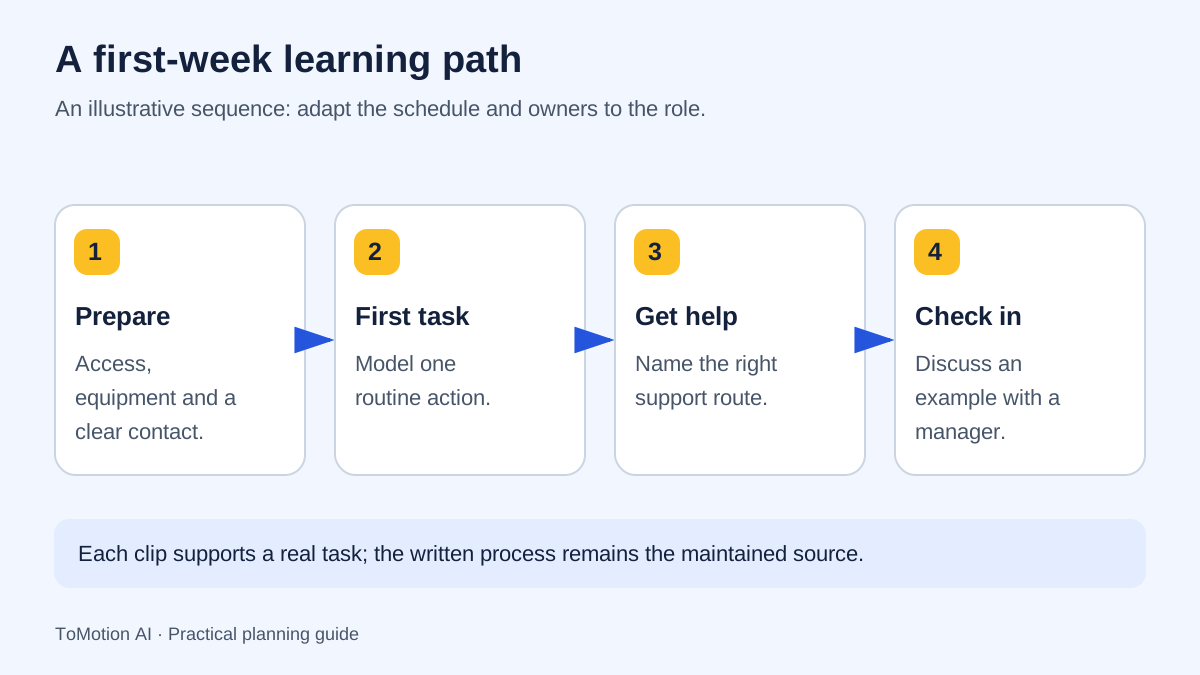
List the moments when a new employee needs an answer: before arrival, while setting up, during the first assignment and when something goes wrong. Assign an owner to each answer. A polished welcome video cannot compensate for an unclear support contact or an unavailable account.
The US Office of Personnel Management’s sample checklist separates day-one activities from later first-week tasks. That is a useful planning example, not a universal policy. Build your own sequence around the role, location and approved procedures rather than copying another organization’s requirements.
| Moment | Video purpose | Companion resource |
|---|---|---|
| Before arrival | Explain what to expect and who to contact | Current arrival instructions. |
| First day | Introduce the team and the first essential task | Role-specific checklist. |
| First assignment | Explain the goal, handoff and definition of done | Approved task procedure. |
| First problem | Show how to ask for help with useful context | Current support and escalation route. |
Use animation for context and real screens for exact clicks
An illustrated explainer works well for showing how teams connect, why a process exists or where a decision changes the next step. A screen recording is usually more suitable when the learner must find a specific button in a real application. These formats can sit next to each other in the same onboarding resource.
For example, a short animation can explain why account access is protected. The setup article can then show the current sign-in screens. Avoid asking an image generator to invent a convincing copy of an internal system and treating that illustration as training evidence.
Gather only the facts needed for this task
Create a small source packet for each video: the current procedure, the owner, the audience and the action the learner should take. Remove personal information and sample credentials from screenshots. Use a demonstration account for any real interface recording.
Keep conditional rules intact. “Ask your lead before ordering” is different from “ask your lead if the order exceeds a threshold.” If a policy has an exception, include it or link clearly to it. An AI-generated simplification should not silently become a new company rule.
Write a welcome that leads to a useful action
The following script describes a fictional team. It shows how a welcome can orient a new employee without pretending to cover their entire job. Replace the names and steps with your reviewed process, and have the responsible person approve the final video.
Welcome to the team. Your first goal is to find the people and information that will help you work confidently. Start with the first-day checklist your manager has shared. It identifies the accounts and introductions you need before your first assignment. If a step is unavailable, note what you tried and contact your onboarding buddy. You do not need to solve every problem alone. Before the end of the day, meet your manager to confirm what is ready, what is still blocked and what you will work on next.
Create the draft in ToMotion
Prepare a prompt containing the approved facts, or use Use own script for reviewed narration. Put scene direction in Video instructions: a simple first-day timeline, a checklist and a support handoff may be more useful than a sequence of generic office scenes.
Choose landscape for a desktop training page or portrait for a phone-focused communication. Check where employees will actually watch. Avoid making the text so small that it is readable only on the creator’s large monitor. A shorter script with one visible action per scene is often easier to review and maintain.
Review with the process owner and a new viewer
Ask the owner to review factual accuracy and ask someone unfamiliar with the procedure to follow the explanation. These are different checks. The owner may unconsciously fill gaps that a new employee cannot. Ask the new viewer to describe their next action without replaying your explanation for them.
Record the questions they ask. If several viewers miss the same handoff, change that part of the script or visual. Do not use watch completion alone as proof that employees can perform the task. A short practice activity or manager check-in provides a more direct check.
| Reviewer | Question |
|---|---|
| Process owner | Are the steps, exceptions and contacts current? |
| New viewer | What would you do next, and where would you ask for help? |
| Publisher | Can people find the resource and access its text alternative? |
Maintain the video alongside the written procedure
Store the video URL, source document, owner, approval date and update trigger together. When the procedure changes, check the video as part of the same update. Keep the approved source available so employees can verify a detail without scrubbing through the recording.
Plan captions and a text alternative when preparing the script. W3C’s guidance helps teams account for people who cannot hear the audio or see important visual information. Distribution permissions and workplace training obligations should be handled through your organization’s existing processes.
Sources
Quick checklist
Identify the role and first task.
Confirm every contact and exception.
Use clean demonstration data.
Separate narration from scene directions.
Ask a new viewer to explain the next step.
Set an owner and update trigger.
FAQ
Can AI create a complete onboarding program?
It can help produce explanations, but a working program also needs access provisioning, role-specific procedures, people for support and a way to check understanding.
Should every onboarding video be short?
Scope each video to a useful task. Split unrelated goals, but keep the context and exceptions needed to act correctly. There is no single duration that fits every role.
Can I upload the employee handbook directly?
In the reviewed ToMotion create workflow, paste the selected source text into your brief or adapt it into a script. The reference attachment accepts images; do not assume it imports an entire handbook PDF.
Create your own AI video
Use ToMotion AI to turn prompts, scripts and prepared source material into narrated animated videos.